
How to Pay a Terminated Employee in Rippling
You can pay terminated employees and contractors in Rippling. We'll cover two ways to include a terminated employee or contractor in payroll in Rippling below.
- How to include a terminated employee on an off-cycle pay run
- How to include a terminated employee on a regular pay run
Heads up! If you're paying a terminated employee severance, be sure to use the Severance pay type so that it's taxed properly.
-
1How to Include a Terminated Employee on an Off-cycle Pay RunMost often, administrators prefer to create an off-cycle pay run to pay a terminated employee.
- From the dashboard, open either the Payroll or Global Payroll app from the Finance section of the Rippling sidebar > Create an off-cycle pay run.
- Configure your off-cycle run by answering the questions on the setup page.
- Click the gear icon on the Add employees to payroll page > Edit.
- Toggle the Override the default employment statuses setting > check the box to include individuals with a Terminated status > Save.
- Next, search for the employee/contractor.
- Terminated employees or contractors will be notated through an Offboarded description beneath their name, as seen in the visual below.
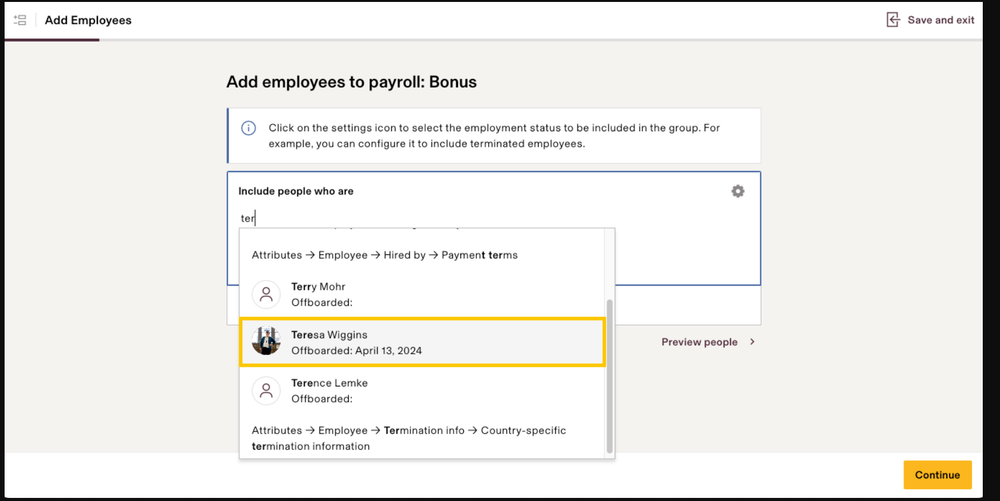
- Terminated employees or contractors will be notated through an Offboarded description beneath their name, as seen in the visual below.
- Select the individual's name to add them to the off-cycle run.
Tip: If you don't see the terminated individual's name, navigate to the employee's profile > Role information. If the Legal entity field is blank, select Edit and choose a company. Once you save this information, the name will appear on the off-cycle pay run. -
2How to Include a Terminated Employee on a Regular Pay RunYou can also add a terminated employee to one of your existing, regular pay runs.
- From the Payroll or Global Payroll Overview page, select a pay run.
- Click the Add an employee icon.
- Begin typing the terminated person's name, and select from the suggested list
Once you've added a terminated employee to a pay run, you can pay them just like any other employee. You can enter in amounts to pay them for salary, or add other pay types such as bonus, commission, or severance by clicking the "+" icon
If you still have a question, we’re here to help. Contact us