
How to Pay Employees by Paper Check?
In this article:
- Introduction to paying by paper check
- Reasons for paying an employee by paper check
- Update the payment method for an employee to paper check
- Frequently asked questions about paper check
-
1Introduction to Paying by Paper CheckIn some circumstances, you may want to pay your employees via paper check. This allows you to write or print a check for employees' net pay on your own check stock, same-day. When doing so, let Rippling calculate the net pay for the employee by either updating the employee's payment method within a pay run to "Write a check" or by running a manual payroll. This ensures that net pay and withholdings are calculated correctly, and no future adjustments are required.Note: Rippling PEO customers typically do not have the option to pay via paper check. Because Rippling PEO is a co-employer, we must transact all employee payments under Rippling PEO's account and entity (EIN). As a result, we cannot support in-house paper checks.Rippling PEO customers can process direct employee payments on a rare, as-needed basis through Rippling's manual payroll process. PEO customers should only use this process to comply with final wage laws (requiring a specific check date), or similar policies, if you cannot reasonably comply through the standard Rippling payroll process.
-
2Reasons For Paying an Employee by Paper CheckReasons for paying by paper check may include:
- You need to pay employees the same day.
- An employee doesn't have a bank account set up and can't receive funds via direct deposit.
- You've already paid an employee by paper check, and now you need to report amounts and withhold taxes on those payments
Important: As a reminder, please make sure to process the check details through Rippling payroll to calculate the net pay total that you will pay to the employee. Rippling will take into account the employee's current withholding calculation for taxes and any relevant deductions in order to produce the proper net amount for your paper check. -
3How to Update the Payment Method for an Employee to Paper CheckTo update the payment method for an employee to paper check, follow these steps:
- From the sidebar, select Finance > Payroll.
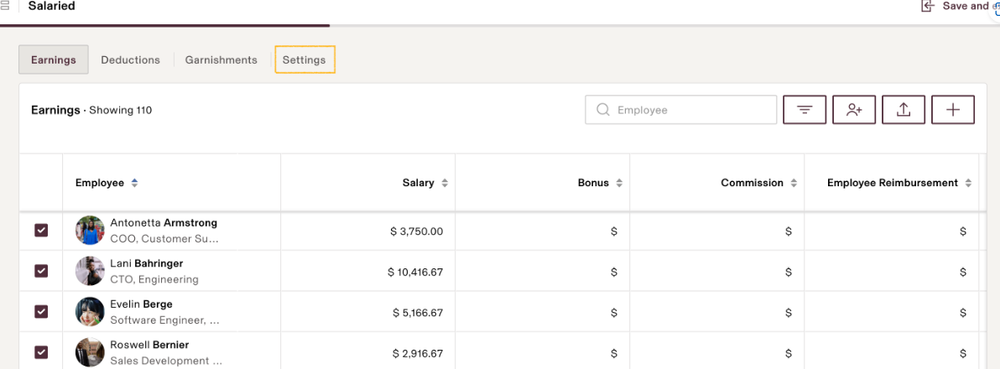
- Click a pay run or create an off-cycle run. Inside the pay run, click the Settings tab.
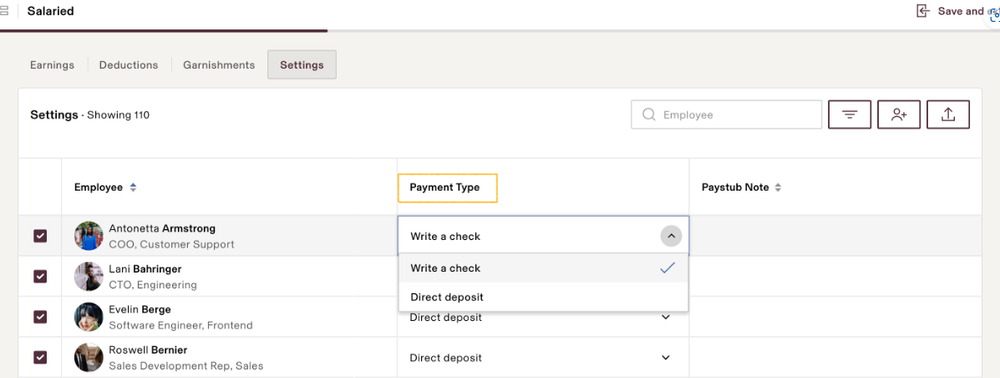
- Use the dropdown in the Payment Type column to change to pay by check instead of direct deposit.
- Rippling will calculate the net pay for any employee you're paying by check. You then need to write or print a check for these employees on your own check stock. Rippling will still withhold and remit the taxes.
-
4Will Paying an Employee by Paper Check Generate a Paystub?
Yes. Paying employees by paper check will still generate a paystub. Employees and permissioned administrators can find paystubs via the following steps:
- Open the employee's Rippling profile.
- Select the My Pay section > Pay sub-section.
- Review pay stubs
Please note the "write a check" status will affect the pay day emails. Employees will not get a pay day email for payments processed with the "write a check" status. -
5What if I want to issue a paper check within a regular payroll run?The instructions listed above for selecting "Write a check" as the Payment Type within the settings of a pay run will work within any pay run, whether it's a regular scheduled payroll run or an off-cycle.
-
6Once a Payroll is Processed with the Write a Check Payment Method Can It Be Changed Back to Direct Deposit?No, once a payroll is moved to the Paid tab with the write a check payment method, it cannot be switched to direct deposit. The expectation is that your company will move forward with the manual payment directly to the employee. This can be done via a direct banking wire or in house check outside of Rippling.
-
7Can I Set Up Rippling to Print Paper Checks for Me?Yes. For details, see our guide to printing paper checks from Rippling.
-
8What if I Have an Employee Whom I Always Want to Pay by Paper Check?To set up an employee for regular payment by paper check, follow these steps:
- Open the employee's Rippling profile.
- Select the My Pay section > Bank accounts sub-section.
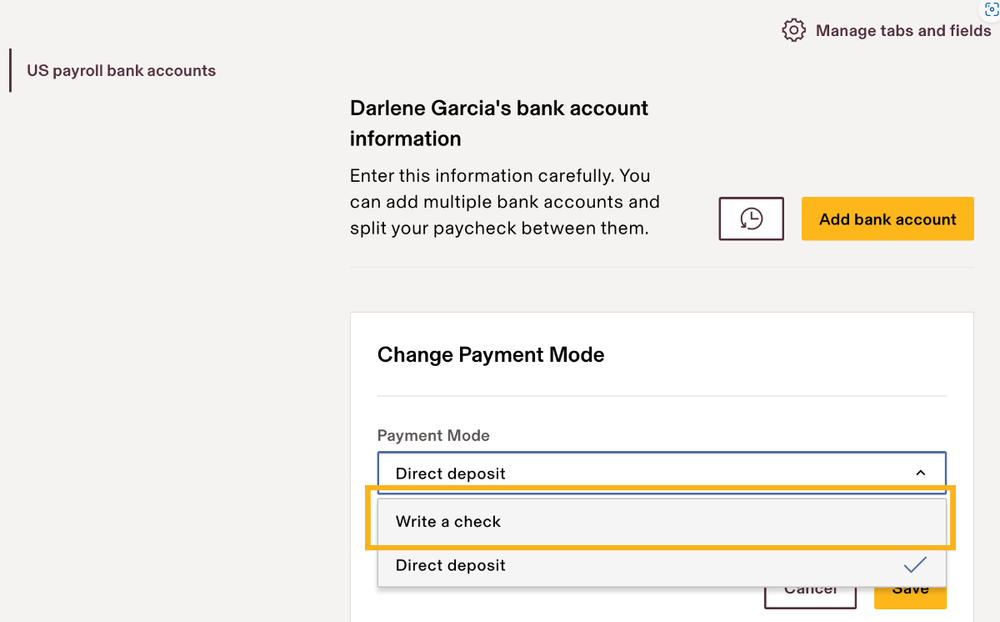
- Under Change Payment Mode, select Write a check.
- Click Save to save the update
-
9End
If you still have a question, we’re here to help. Contact us