
How to Pay a Bonus in Rippling
You can pay supplemental income, like bonuses, in Rippling through an existing pay run, or through a special off-cycle pay run. In either instance, you can choose how you'd like the bonus to be taxed.
help.rippling.com/s/article/360056301793
help.rippling.com/s/article/360056301793
-
1Different Options to Giving out BonusesIn this article:
Option 1: Add a bonus to an existing pay run
Option 2: Add a bonus to an off-cycle pay run
Taxation of bonuses -
2Option 1: Add a Bonus to an Existing Pay Run
- If your pay runs don't already contain the Bonus pay column, click the "+" sign to the right of a pay run.
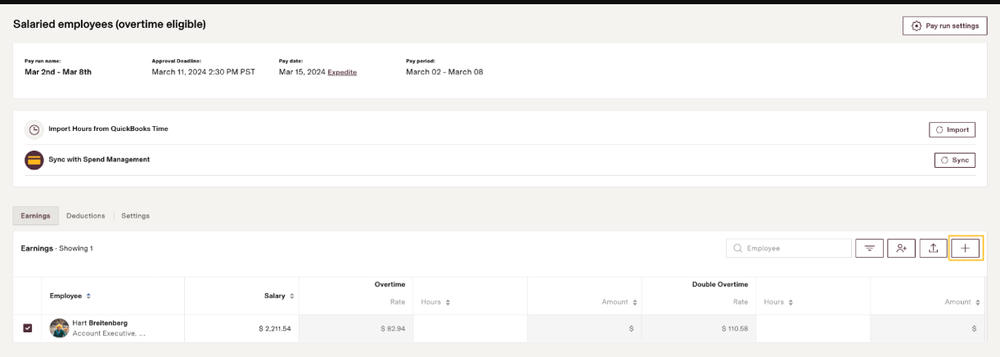
- Check the box next to the bonus pay type to add to the pay run.
- Review how the bonus will be taxed. You can either choose to withhold at the supplemental flat rate of 22% or at the employee’s default pay frequency. To make this selection, click the Pay run settings button on the top right.
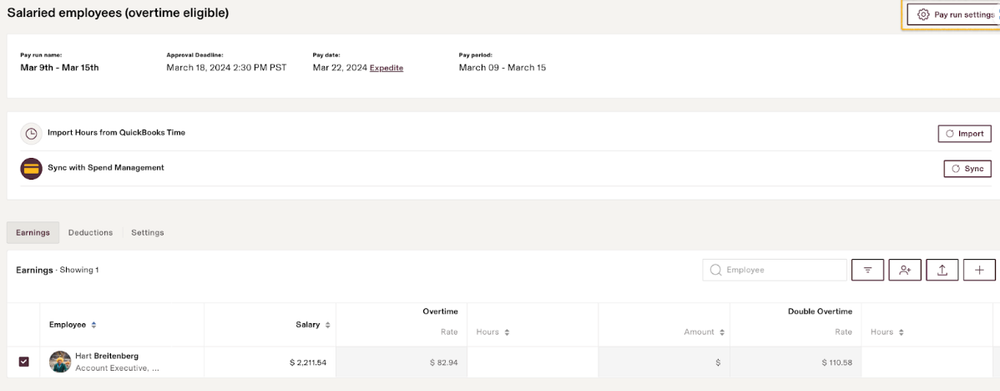
- If your pay runs don't already contain the Bonus pay column, click the "+" sign to the right of a pay run.
-
3Option 2: Add a Bonus to an Off-Cycle Pay RunIf you don't want to wait an entire pay cycle to pay a bonus, you can use an off-cycle pay run.Not familiar with off cycles? Review step-by-step guide on off-cycle pay runs.
- From your payroll app, click Create an off-cycle pay run on the Overview page.
- After naming your pay run and selecting who will be paid, you'll have the option to gross up, or specify the net pay of the bonus. Some companies use this option when they want employees to receive a specific amount in net pay, or take home pay.
- Specify if the bonus will be paid out via direct deposit or check. Some companies prefer to cut a check for employee bonuses.
- Choose the date of the bonus; keep in mind that you won't be able to select a past date so it's best to do this in advance of the date you intend employees to receive their bonus.
- Choose if you'd like to include a pay period on the bonus check.
- Verify if this off-cycle payroll run should include percentage-based employee deductions and company contributions.
- Once you select Yes, this run includes bonuses / commissions, you'll be asked if you'd like to withhold at the flat 22% rate to avoid over withholding. If any regular earnings are included on the run, they'll be withheld at the employees' normal pay frequency.
- Choose if you'll use employees' regular withholding, or if you plan on only paying contractors or 1099 workers.
- Choose if you would like additional tax withholding to apply to this run.
- Once on the pay run view, you can either manually enter amounts in the Bonus column or use the CSV import.
- If you don't see the Bonus column, click the "+" sign to the right of a pay run and check the box to add the pay type.
- After you've finished adding the bonus amounts, approve/submit the pay run.
-
4Taxation of BonusesWhen adding a bonus to a regular or off-cycle pay run, you can choose whether you want bonuses to be taxed with the employee's regular withholding amount or the supplemental rate of 22%, since the additional earnings are considered supplemental income.
- Regular withholding amount
Choosing to tax at the employee’s regular withholding amount will result in withholding taxes from the employee as if the bonus will be repeated in all subsequent pay runs similarly to regular wages. This may result in over withholding for employees.- Flat supplemental rate
Alternatively, you can withhold bonus income at a flat rate of 22% for federal tax purposes. To select this option, either create an off-cycle pay run, or click the Pay Run Settings gear icon on the top right of a regular payroll run.
Select that you want to withhold supplemental pay types at a flat rate of 22%: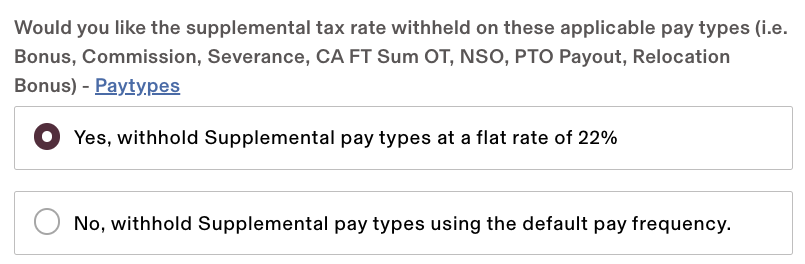
- All regular earnings will still be taxed according to employees’ federal W-4 and state withholding certificate elections.
Disclaimer: Rippling cannot provide tax advice. We recommend consulting with a tax professional if you have any questions about how to tax your employees.
The way you as the employer decide to withhold taxes on bonus income doesn't affect the amount employees ultimately pay in taxes. It only impacts the amount initially withheld from their check, and is only applicable to Federal withholding. At the end of the year, when the employee files their tax return, they will either owe money or receive a refund if they have over or underpaid during the year.
If you still have a question, we’re here to help. Contact us