
How to Run a Manual Payroll for My Employees?
-
1What is a manual payroll?A manual payroll in Rippling allows you to cut a check for employees same-day, while still using Rippling to withhold taxes, calculate net pay, and ensure there are no future adjustments needed in the system.
What are some of the reasons I would want to run a manual payroll?- Pay employees the same day
- Report amounts and withhold taxes on payments you’ve already made to employees
Important: If you're writing a check, you must run a manual payroll in Rippling so we can accurately calculate net pay and withhold taxes. Employees’ taxable rates are impacted by what they have been paid in the year, making it difficult to calculate an employee’s net pay for one pay period. -
2How to run a manual payroll?To run a manual payroll, follow these steps:
- From the sidebar, open Finance > Payroll.
- Find the pay run that you want to run and click Run Payroll.
- Inside the pay run, select the Settings tab next to Earnings.
- Next to each employee's name, update the Payment Type to Write a check.
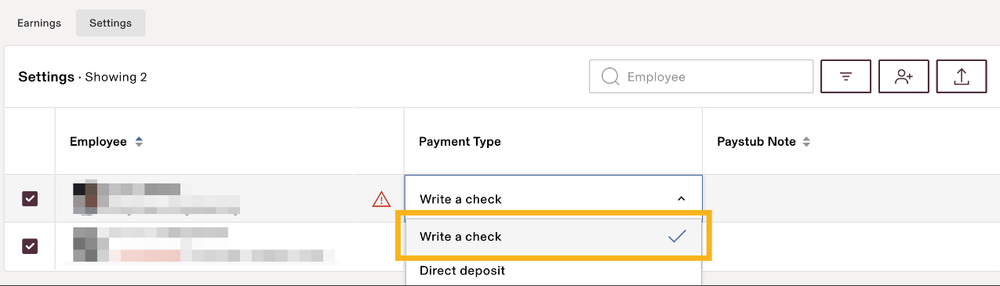
- Once everyone's Payment Type is marked as Write a check, you can update the Pay date in Pay run settings (next to the gear icon) to today's date.
-
3How do I write a check for a manual payroll?You can find the instructions for writing and printing a paper check in this article.
If you still have a question, we’re here to help. Contact us